www.xlr8yourmac.com

Systems  | CPU Upgrades  | SCSI | IDE | Firewire  | Video  | Audio  | Games  | Misc/OS  | Archives  | Search

Searchable Databases of Mac Owner Reports on:
CPU Upgrades | Drive Compatibility (HD/DVD/CDRW/Tape) | System/Graphics Benchmarks | Game Reviews

Got Questions? - Check the FAQ for Answers
800+ Answers on CPU Upgrades/CDR/DVD/Storage/Video Cards/Firewire/Games & More!
Email News/Tips/Reviews | Advertise here
Return to News Page

Click  for CPU Upgrades!
Click for CPU Upgrades!

Check that X1900 XT for Dust Buildup
Posted: 7/2/2007


Using boot camp to boot into XP to play all my favourite windows games on my Mac Pro, everything was going swimmingly for months. Using the X1900 XT, I used Catalyst to overclock modestly, and enjoyed beautiful visuals with great frame rates. Then one day, Prey decided to keep quitting. No problem, it was only one game. Then, I started to notice that the more graphically demanding games either would quit unexpectedly, or more scary, I would get corruption in the display. I figured, well maybe it's time to back off the overclocks.
Unfortunately, even at stock, I was getting some corruption in games like Need for Speed Carbon (yes, I know it's "coming soon to the Mac!" but I've been playing it for weeks on my Mac already in XP).

On a whim, I opened up the box and inspected the card. All seemed well, fan was operating okay. Just to be certain, I removed the card. I looked at the front of the HSF assembly, where the air comes in. This is what I saw:
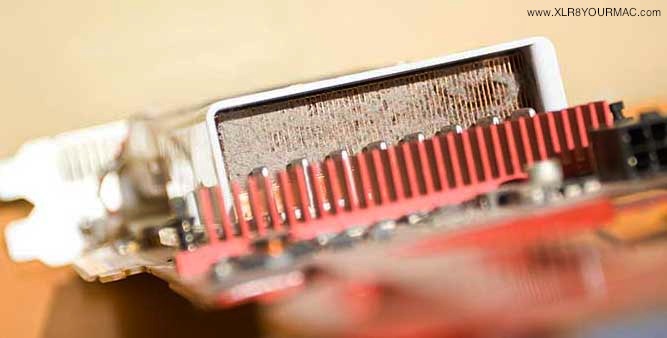
dusty fins

Yikes!
I went around to the back of the card, and gave a nice, sharp puff into the PCI exhaust grill. This is what came out the other side:
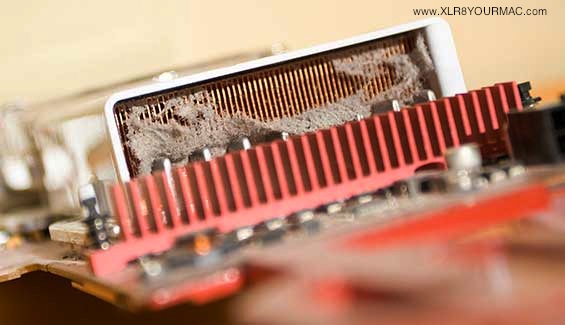
When I picked it all out:
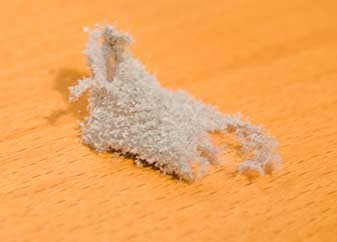
dustball

I also unscrewed the fan assembly, because the red rotors were grey, too. Blew them out and reassembled. Popped the thing back in. Booted up Win XP. Went into Catalyst and put everything on max, and then overclocked to 700/650 (just to be sure, y'know?). Played NFS Carbon for about 30 minutes. Nary a corrupt pixel now my friend!

Seems to me that the big fat grill on the Mac Pro needs to have some kind of dust filter. I don't live in an overly-dusty house!
-Vader


External Storage Solutions!

OWC XLR8 SPECIALS!
(see full list)

= 3.5in HARD DRIVES =
1TB SATA HDs from $79, 500GB 7200rpm/16MB cache HDs from $59

= NOTEBOOK HDs =
500GB 7200rpm from $145.49, 500GB 5400rpm from $96.97, 320GB/7200RPM/16MB from $79.89. WD Scorpio PATA 320GB $109.

= MEMORY =
2009 Mac Pro kits, 2008-2006 Mac Pro FBDIMM kits, Upgrades for MacBooks/MacBook Pros/iMacs/Mac Minis!
Also ram for G5, G4 and G3 Macs from under $30!

= OPTICAL DRIVES =
Internal and External Superdrives/Blu-Ray drives.

= VIDEO CARDS/LCDs/TV =
GTX 285 for Mac Pro, Radeon 3870s, LCD Displays, TV tuners and more.

= SOFTWARE =
Prosoft Drive Genius 2 (under $60), Drive Genius 2 + Data Rescue 2 bundle, iWork family pack and more w/big discounts.

= WIRELESS =
802.11N/g/b adapters from under $20!

= CPU UPGRADES =
G4 7448 and G3 1GHz upgrades from under $100

XLR8YourMac.com T-Shirts
Support this site!


FasterMac.net
Internet Access


Mac Help Now!
Freq. Asked Questions
(Check First!)

Mac Model Articles

CPU Upgrade Articles

Video/Card Articles

Storage Articles

Search Mac Drive Upgrades/Compat. Database

Search the CPU Upgrade Database

Search the
Game/System Perf. Database

Read Game Reviews


Recent Reviews and Articles:
Listing/links to recent articles, guides and reviews you may have missed.  Details

 
= back to www.XLR8YOURMAC.com =


= Other Site Topic Areas =
Systems | CPU Upgrades | SCSI | IDE | Video | Firewire | Audio | Tips/Misc | Mac OS Articles | FAQ


Copyright © , 1997-2009. All Rights Reserved
All brand or product names mentioned here are properties of their respective companies.

Legal: Users of the web site must read and are bound by the terms and conditions of use.